Need WordPress help for your specific website? Have a question that you want answered by a live human in real time? Look no further. Our Founder (Jaki Levy) is offering free WordPress help for you, every Wednesday.
What’s the catch? No catch.
Every Wednesday, he will offer a (free) 30 minute session. Just find a 30 minute time slot that works for you, and get your WordPress questions answered. Think of it like open office hours, but virtual.
Our doors open. We’d love to help you. So come on in! Schedule your session and get your initiatives off the ground today.
Note: We are not asking for any monetary contributions for this service. However – if you would like to spread the love, please consider making a contribution to World Central Kitchen ahead of our 30 minute session. They have been helping individuals throughout the pandemic, and are continuing relief efforts for Ukrainian refugees.
About Jaki Levy
Jaki is a 15 year WordPress veteran. He’s helped build websites for MoMA, MTV, Sotheby’s, and other global brands. In addition to building custom WordPress websites, he’s taught small business owners how to optimize their websites (and businesses) for maximum performance. In some instances, he’s helped business double their revenue, year over year.
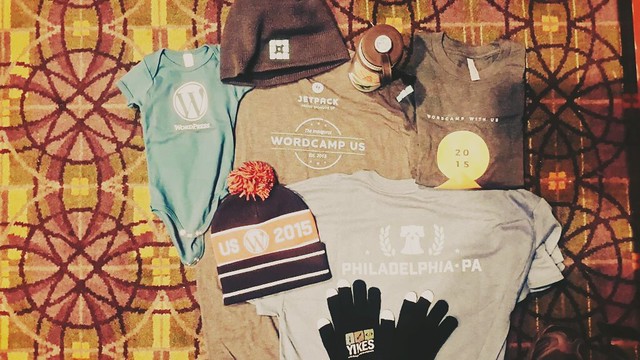
This year’s inaugural WordCamp US was hosted in Philadelphia. Over 2,000 WordPress makers and users attended the conference. Below are some photos I took while at the conference in Philadelphia.
Ever since I’ve been attending WordCamp SF, Matt Mullenweg would deliver his “State of The Word” , summarizing key concepts and developments in the WordPress world.
You can watch this year’s State of The Word Below :
The Nepal earthquake was the deadliest earthquake to strike the region during our lifetimes. With a perspective of hope and optimism, we are looking for ways technology is being utilized to help in the recovery efforts. From the first moments of the quake to many weeks after, we’ve seen people mobilize on the ground, and online to help organizations, individuals, and communities recover.
From day one tech companies have been making a real difference. Facebook activated the Safetycheck feature that helps people find out if their loved ones are safe. Facebook also stepped up to the fundraising raising plate. Over 750,000 people donated via Facebook, contributing over $15 million to support the International Medical Corps relief effort. Facebook donated an additional $2 million to local recovery efforts to help those in affected areas. Facebook did not act alone. Skype and WhatsApp also made call to the area free to place for days after the disaster.
We would like to remind you that all Skype calls from Nepal to landlines and mobile remain free: http://t.co/FoY3BkFvJ3
More than $415 million is required for the 8 million+ people affected by the earthquake in Nepal. As of May 19th, there has been only 17% of required aid met.
— UN OCHA Asia Pacific (@OCHAAsiaPac) May 19, 2015
To address these unmet needs, we asked “How might we support those who are committing to innovate, fundraise and help using #techforgood in Nepal?” It is in this spirit that we’ve created this resource guide.
Whether you want to get involved directly or understand how social media, crowdsourcing and technology are making a difference, we hope this is useful for you. Below is a collection of our favorite tools and efforts that are making a difference today.
Learn to map!
For Nepal, map data is key to humanitarian missions. Opensource maps are giving critical information to groups on the ground. Read about the movement of thousands joining to map around the world. MapGive helps new volunteers learn to map and get involved in online tasks. Start an account and learn here. And make sure to take a look at the Open Streetmap in action.
Anyone can logon and share data sets about Nepal to keep the public and relief teams informed. Launched by the UN Office for the Coordination of Humanitarian Affairs, the Humanitarian Digital Exchange is an open source platform where data comes to life.
A picture is worth a thousand words. This picture, though, is likely worth alot more. Take a look at this to view the continued tremors visualized. The number of lives impacted is simply heartbreaking.
Give!
Gift guides recommend giving cash over in-kind donations. So what kind of giver are you? We’ve seen a lot of momentum being built by crowdsourcing campaigns that aim to give directly to people and combat corrupt local officials that may misuse funds. NGOs and relief groups are also very helpful. They bring years of experience and are set up to release funds before you donate so they can respond quickly.
The UN Central Emergency Response Fund (CERF) has already released $15 million to kick-start immediate life-saving relief work in Nepal. CERF receives contributions year-around so that humanitarian partners can act quickly when and where crises strike.
Looking to support untraditional disaster relief teams? Life IndieGoGo, Ketto.org, and #WeHelpNepal all have very successful crowdfunding campaigns to participate in and take note.
We’re also seeing individuals expand their reach by starting crowdfunding campaigns for large NGOs! By acting as ambassadors for the organizations, individuals are increasing the organizations’ impact. And it’s all based on telling personal stories that cause like minded people to take action.
Share Your Story
Let us know what you find inspiring. How are you making change? Have you seen anything noteworthy worth sharing? What ways are you using #techgood to make a difference?
The Brooklyn Country Cantina is an annual party produced by The Defibulators and friends. The event features loads of bands and is an unofficial party that happens during the annual SXSW festival held in Austin.
This year, we were on hand to help setup, tweet, post some videos, and provide some on site tech support. Here’s a short clip of The Mastersons – one of the many bands we shot – on video – during the earlier part of the day.
If you want some more good stuff, definitely check out the photos posted by The Bluegrass Station. They’re a fantastic set of images shot by a local Austin photog!
Overall, there were about 30 bands over the course of the day. So we went ahead and made a little playlist for your enjoyment via Spotify. Hope you enjoy that music! We did.
There’s loads of parties and bands that come to Austin for SXSW. According to Operation Every Band, there’s over 2,100 bands playing in Austin over just 1 week! That’s an average of 300 bands every day. Some bands we met played over 10 shows in just a few days.
So we’re thrilled that some folks think this is the best party during the festival. Aw Shucks. Now we’re blushing.
For even more SXSW musical goodness, make sure to check out NPR’s SXSW short list. It features 100 songs from musicians that played at SXSW. Some of those musicians played at our very own event. And all the songs are downloadable. Thanks, NPR!!!
And many many thanks to The Defibulators for putting this whole shebang together! We’ll see you next year at SXSW!
To our clients – a message from our hosting partner –
The majority of Cloud Providers across the world will be conducting maintenance for a security related issue. In order to implement the patch, our 3rd party data center providers will be rebooting. For more information about providers responding to the situation please visit this article: https://gigaom.com/2015/02/27/xen-security-issue-prompts-amazon-rackspace-cloud-reboots/
3rd party data center providers have informed us that they will be conducting a maintenance across their environment on March 5, 2015 for 24 hours. We believe that the maintenance may result in a brief interruption of service to your site during a server reboot. We are contacting customers immediately to let them know of this emergency maintenance.
This maintenance window spans the entire 24 hours and the reboot could happen at any time during the maintenance window. We expect a brief period of downtime while the providers implement the patch. Outside of the brief downtime, there should be no impact to your site. We will be monitoring the situation closely.
Last year, I rode my bike 545 miles in 1 week from SF to LA. With 2,500 other cyclists, we raised over $15 million to benefit the SF AIDS Foundation and the Los Angeles LGBT Center. This is what AIDS Lifecycle is. An amazing community of cyclists, activists, and caring people. All riding to make a real difference.
This year, to help raise even more money, we’re providing web services in exchange for donations. And it all goes to AIDS Lifecycle. The way this works is pretty easy. You need web help. We provide that help. Instead of paying us cash, you provide a tax deductible donation directly to the ride. Not sure what we do? Take a look at our wide range of services.
Interested? Just fill out the form below and let us know what you need help with.
And yes – there are limitations. We can’t build you a social network like Facebook or an ecommerce store that has Amazon.com like features in exchange for a donation. Unless that donation is really really big, of course. Then we’ll find a way 🙂
As part of our “Get Your Sh*t Together before 2015” campaign, we’re offering small businesses free Google Apps setup help.
What does this mean?
Well – if you’re still using GoDaddy, Yahoo, AOL, Hotmail, or yes – even a gmail.com email address for your business, it’s time to get your sh*t together. We’ll help you setup a professional, spam free, email address for your business (like [email protected]) and make sure it’s being delivered by Google.
We made an announcement on our Facebook page (below) but not sure if peeps saw it. So here we are. Writing a blog post.
If you’re ready to “Get Your Sh*t Together” , contact us via the form below.
[gravityform id=”12″ name=”Get your sh*t Together” description=”false”]
Note :
If you’re a large business or enterprise and need help migrating your email to Google Apps OR you need help setting up your emails on your mobile phon tablet devices, please let us know in the form above. We can guide you through the process, but it won’t be free.
Also – if we end up getting a crazy amount of demand, well, it’s free folks. We’ll do our very best to process and automate things as quickly as we can.
And if you really need more info – read the stuff below –
What is Google Apps?
Google Apps is a cloud-based productivity suite that helps teams communicate, collaborate and get things done from anywhere and on any device. It’s simple to set up, use and manage, so your business can focus on what really matters.
Millions of organizations around the world count on Google Apps for professional email, file storage, video meetings, online calendars, document editing and more.
Looking professional matters, and that means communicating as [email protected]. Gmail’s simple, powerful features help you build your brand while getting more done.
Access from any location or device
Check email, share files, edit documents, hold video meetings and more whether you’re at work, at home or in transit. You can pick up where you left off from a computer, tablet or phone.
Enterprise-level management tools
Robust admin settings give you total command over users, devices, security and more. Your data always belongs to you, and it goes with you if you switch solutions.
We believe in the power in the digital tools to respond, shape conversations and take action in times of urgency.
And we’re both saddened & disgusted by the situation in Ferguson. The weight of the situation lingers in the air leaving many of our friends & colleagues asking “What’s next? What can I do? Why should I care? Does this even affect me?”
Yes.
Our network has a rich trove of information and sentiment. We connect with community organizers and nonprofits every day in the media space. And so we are writing this post as an inspiration for everyone reading this.
Dig deeper. Express yourself. Learn. Shape the dialog. And unite in solidarity with #Ferguson.
Every action matters. Your voice counts. Do what you can. Don’t let apathy be the rule of the day. Stand together because #blacklivesmatter!
Over the last few weeks, we’ve seen an amazing amount of Collaborative Community Organizing. And over the last few days, people in 37 states have been protesting in the street, stopping traffic, and expressing their desire for justice. Below are a few exemplary sites and projects we’ve found over the last 24 hours. And of course – if you have your own to share, please let us know in the comments!
Links!
No Indictment.org is a google doc (as of now) put together by local community organizers in Ferguson. It’s been a great low-tech way to get critical mass, and massive collaboration in place.
Ferguson Response is a collection of national events taking place. If you’d like to add your own event, or local action, go to the site. Or join an event already posted.
QZ posted a nice article on “things white people can do.” A great read on creating more empathy, and taking direct action.
There has also been a focus on Social Media’s role in bringing people together.
No surprise here. Tools like twitter and Nationbuilder have helped communities organize, fundraise, and spread the word. It’s been a welcome change to the mainstream media, and is a direct example of “democratizing publishing” as well giving people the chance to express themselves.
#BlackLivesMatter is powerful not just as a microaffirmation, but as a hashtag, it becomes a group utterance, it ties us to each other.
And if you are looking for a direct way to help – donate to Nicole Lee’s fund. She is voluntarily working as a legal observer in Ferguson, and documenting what is happening – on the ground.
On a day to day basis, we provide countless organizations and businesses WordPress support. And WordPress’ mission is to “democratize publishing.” We believe that part of this mission extends to free speech, and the ability to express yourself freely – physically, technically, emotionally. So we support the efforts to organize locally. And to do what you can to make your life matter.
We’d love to hear your thoughts. Please feel free to comment below and add your resources.
Updated
Have an idea for a solution? Submit it to #FergusonNext, a solution-based collaboration between Guardian US Opinion, The St. Louis Post-Dispatch Editorial Page, Ebony.com, Colorlines, The St. Louis American and The St. Louis Riverfront Times.
This year at WordCamp SF, Matt Mullenweg (the founder of the WordPress project), delivered the State of the Word – a compilation of 33,000 survey responses. We live tweeted part of it here.
Some highlights of The State of the Word :
over 23% of the web is powered by WordPress
nearly 25% of respondents to the survey (7,500+ people) make their living off of WordPress
Making WordPress generates over $1 billion in full-time jobs
2014 was the first year where more people used WordPress in languages other than English
Throughout his presentation, Matt emphasized #mobile. From making the WordPress admin area responsive, to the fact that there are more mobile phones than there are people in the world, it’s clear that mobile is not only the future – mobile has arrived.
Excited about the internationalization and mobile-first focus for WordPress 2015. #wcsf14 State of the Word. Nice job Matt!
Overall, these updates will make Making WordPress easier. And hopefully, it will make the mission of WordPress – to democratize publishing – even easier.
This weekend, Arrow Root Media’s very own Kyle Stewart will be holding this year’s HACKtivation hackathon in San Francisco, where several non-profit and other socially aware groups will get together to collaborate on projects for their causes, focusing on homelessness this year. The event serves as a time for the community to get together and work together, not only to develop the projects, but also educate others and create new ideas.
The event’s past success has drawn a diverse and great array of partners, including GoodWill, Spotify, and Code for America, and, of course, Arrow Root. With over twenty partners this year, the event seeks to create a lasting impact on the community. A large goal of these collaborative efforts is to fulfill the tech needs of a community as fast and economically as possible by drawing an effort from a group, rather than just individuals.
In a Shareable interview, Kyle said that while “hackathons do not create change themselves, it’s the sustained efforts of people working together for long-term solutions that will have an impact.”
The project was also recently featured on Torque Magazine, WP Engine’s source for WordPress Community News.
Despite the city spending $200 million per year on problems related to homelessness, the problem persists. “We want to help bring in new energy and ideas. Creative solutions come with creative people and it’s those people getting involved that can have impact in new ways,” said Kyle in response to whether homelessness needs to be treated in a different manner. “Homelessness and poverty are not technology problems, they are people problems.”
The event will start today, Friday, at 6 p.m. local time at Glide Memorial Church, with tomorrow’s hackathon session going from 9 a.m. to 1 a.m., and ending with a Sunday session 8 a.m. to 1 p.m.
There will be a closing ceremony at 4 p.m. that day, as well, at the Code for America office.
Costs for participation will be $20 for students, $40 for others.
We’re excited to announce that in less than one week, we’ll be leading a WordPress Workshop in Berkeley.
Here’s a little bit about the course, which is geared towards folks getting started :
We’ll go over the basics, talk about hosting, review a few popular WordPress features, and get started on creating content. We’ll also discuss how WordPress differs from other systems, and what advantages there are to working with WordPress.
If you can’t make it or don’t live in the area, you can still spread the word about our WordPress classes, and let others know!
Here’s some past praise from students –
Not only is Jaki an innovative, collaborative, informed, inspired instructor, but the students are fascinating as well. They have great projects that they’re working on. I’m always delighted to hear about them. Their questions are often ones I will need answered along the way too. I’m so glad that Jaki weaves the students’ questions and comments into our class time. It’s been a blast! These remarks are high praise from a relatively non-techie person like me. This course has surpassed my expectations in every way.
Jaki is the shining star in this course. He’s generous, wise, experienced. He has an amazing ability to address lots of random roadblocks that the students throw at him and still, for the most part, stick to his agenda. He’s even keeled and clear. The material is complex, but not for him, and even that aspect of the class is so valuable. Rubbing shoulders with someone who’s clear, logical, informed, creative and successful in this area makes the goal of constructing a WP website seem doable, even for us non-techies. This has been an awesome experience. I am very inspired to keep going with this.
WordPress Class Details
Location: Impact Hub Berkeley
2150 Allston Way, #400
(Inside the David Brower Center)
Berkeley, CA 94704
Time: Tuesday, February 25, 2014 from 6:00 PM to 8:00 PM (AKST)
SEO is no longer a solution in and of itself. SEO must be paired with content marketing and social media to establish relevance in the new semantic web.
As the weekend is about to commence, so is Dance Films Association’s yearly festival Dance on Camera. It’s a cultural deep dive into movement, experimental collaborations and as noted on DFA’s website a “recognition that dance thrives best in the bosom of a creative community”. The perk of interdisciplinary nature of our clients often is exposure to unique experiences. Take a look for yourself!
A relevant piece of Dance Film Association’s story is their legacy in their genre. In their 42 year history they’ve been able keep current and innovative. That’s no small feat. We have a lot to learn about how they’ve done this. I have a hunch that it might boil down to understanding their niche, being a member centric organization, and meeting the needs of their community of dancemakers and filmmakers.
That’s where Dance Film’s Association has aligned with our expertise in WordPress web development. During our partnership, we have streamlined the process of accepting applications from filmmakers and created archives all the past festivals.
This year we are launching a new phase of their membership system, using BuddyPress. This new system will allow members to connect more easily and share immediate information about their projects and expertise as dance filmmakers through groups. Groups will be small hubs oF connectivity to bring their global community of members closer. We’re excited to present the system to DFA members directly and get first hand feedback and thoughts on its use going forward.
If you’re in New York come join us at Dance on Camera 2014! We guarantee you’ll leave inspired and ready to build something great for your community.
We’re big fans of the arts (which is why we work with so many clients in the arts). This year, we’re supporting Dance Films Association by hosting and maintaining their WordPress site year round.
Make sure to check out their 2014 Dance Films Festival lineup and catch the trailer for the festival below.
We’ve been hard at work here at Arrow Root Media, the last few months hiring new staff and producing awesome experiences for our clients. I’m really excited by the direction we’ve been going, and people are noticing.
Personally, I’m particularly excited about the reviews we’ve been getting on Yelp. We’ve received so much positive feedback on our Yelp, I decided to do a video that would live on our Yelp page – you can watch it below. Though you’ll need to make sure to watch on a desktop. We’re working on a mobile friendly video, and will update that post as soon as that happens.
A little over a year ago, we launched a New Responsive Website for Coppersea Distilling (http://coppersea.com), a craft distillery based in New York’s Hudson Valley.
Today, they announced their partnership with Wilson Daniels, a premium wine importer & marketing agency based in Napa Valley.
From the press release :
Coppersea Distilling is a Heritage-Methods farm distillery located in the burgeoning distilling hub of New York’s Hudson Valley. Coppersea, recently named one of “America’s Coolest Distilleries” by Travel and Leisure magazine, creates spirits of distinction and character from hyper-locally sourced ingredients and employs Heritage-Methods distillation techniques, this means using on-site well water, mashing in open wood fermentation tanks, and distilling in direct-fired alembic copper pot stills. The resulting Coppersea New York Raw Rye is an unaged whisky of unusual creaminess, with notes of black pepper and honey.
To learn more about Coppersea, check out this awesome video by Surrender Pictures.









 A little over a year ago, we launched a New Responsive Website for Coppersea Distilling (