
Archive | Tutorial RSS feed for this section

WordPress on Rackspace Cloud Sites

Installing WordPress can be either an easy or difficult process, depending on which hosting company you’re working with. For people using Bluehost, Dreamhost, and Godaddy all you need to do is go into the control panel and do what is called a “one-click installation.” When running a “one-click installation” script you are basically telling the host where on the server you’d like the WordPress files to be placed, and creating a mysql database (with username and password) to house all the information that will be pulled in through the WordPress site. That is the quick and painless way to create a WordPress site, but not all hosting companies are created equal.

Recently, my colleague and I were in the market for a new company to host our client’s sites on. We were in search of a host that has great support, technology to accommodate database driven sites, respects the privacy of its clients, and has security measures in place which will prevent client sites from being hacked. After reviewing a slew of hosting companies we discovered Rackspace. Not only do sites (referred to as Cloud Sites) hosted on Rackspace run fast, but their chat support is informative and efficient. The only downfall to Rackspace is the arduous process required for doing a WordPress installation on a cloud site. Rackspace cloud sites do not have a “one-click installation” option, so to create a WordPress site you must start from scratch, and do it manually.

This post is split into four sections:
How to Create a Client
How to Add a Site
How to Create a Database
How to Install WordPress on the Server

Read More…

Ways to Backup Your WordPress Site

Oh no! My dog ate my website! That is exactly what it feels like when you upgrade your WordPress site and your older plugins don’t exactly get along with the new software. When dealing with WordPress, it is not uncommon to run into a few bugs and hiccups. Sometimes you upgrade for security (like when a new version of WordPress is released). Or maybe the newer version of that plugin you love runs much faster or looks much sleeker than its crusty predecessor. Whatever reason you chose to modify your WordPress setup, it is imperative that you back everything up – just in case things go wrong (and they do).

So – without ado – here are a few options that will help (and most likely save) you or your client’s website.
Read More…

WordPress Plugins

For the past two weeks, I’ve been leading a wordpress class at 3rdWard. During the first two classes, we covered how to setup hosting, how to use a feedburner account, and how to install plugins and themes.

During the 2nd class, I also listed out a few of my favorite themes and plugins. For a review of what we covered in our 2nd Class, download this document.

In this post, I’ve included a few favorite plugins. For a list of some my favorite themes, visit this post.

WordPress Plugins

Wordtube

This plugin manages the JW FLV MEDIA PLAYER 5.1 and makes it easy for you to put music, videos or flash movies onto your WordPress posts and pages. Various skins for the JW PLAYER are available via http://www.longtailvideo.com

wordTube supports the streaming video format (Format .flv or .swf), sound files as MP3 and JPG, GIF or PNG grafic files. With wordTube you can simply insert it into your blog with the tag [media id="media id"] or as playlist [playlist id="playlist id"].

Since Version 2.0 it supports LongTail’s AdSolution which allows you to run pre-roll, overlay mid-roll, and post-roll advertisements in your media player. Click here to sign up for LongTail.

You don’t need to change the WYSIWYG mode or special HTML knowledge to insert such a tag. You can show a simple media file (i.e. a flv Format) or a playlist of all your media files.

Read More…

Upcoming : WordPress Workshop @ 3rd Ward

3rd Ward Logo

Here’s a freakin’ awesome deal from 3rd Ward : Sign up for the WordPress Workshop (section starting 6/13), Illustrator Intensive (6/13), OR Intro to After Effects (6/19) and get a FREE Apple Wireless Keyboard and Mouse.

Starting June 13th, I will be leading a 3 week workshop on WordPress. I’ve helped many organizations build their sites using WordPress and simply love the platform (in fact, this site is running on WordPress). It’s great for blogs, portfolio sites, and creative folks. You can even run ecommerce sites using WordPress.

Go on. Register for the class

A bit about the class :

You’ll learn the in’s and out’s of setting up, customizing and running your own website using WordPress, the most popular blogging platform.

WordPress is used for top blogs like CNN Money, all the New York Times blogs, and many non-profit arts websites. Simply put, WordPress makes publishing your website much easier.

We’ll start off with the basics (like setting up your own hosting) and then move to more advanced topics like customizing a theme (through the WordPress template engine), and inserting plugins for Twitter and Facebook. We will also set aside some time to review content strategy, site architecture, and look at popular plugins to help you sell your products online. This class will work well for both beginners and experts.

You can register for the class by clicking this link.

And to learn more about wordpress, visit my wordpress archives. Really. Click on that link. Or, you can take a look at some sites I’ve built using wordpress.

Ecommerce Solutions

Note: This post was written for participants in an ecommerce seminar. Please feel free to leave questions + comments below

To sell items online, you need:
a payment gateway (like paypal) to process payments
a good shopping cart solution
an SSL seal (if you’re processing credit cards on your website)

If you’re starting from scratch, don’t have the support of a developer, or just want an online store, consider Shopify. They have beautiful templates, and can help your online store get up and running quickly. Review pricing and take a tour of what
Shopify offers. They’re great!

Below is a “short” list of payment gateways and shopping cart solutions.

PAYMENT GATEWAYS

A payment gateway processes the payment for you. Paypal is by far the most popular payment gateways. Here is a list of other payment gateways.

Paypal
The current leader in processing sales online. They have a great list of resources for shopping carts here.

Google Checkout
Take a look at their merchant center – it’s chock full of resources

ejunkie
A fantastic solution, starts at $5/month. Take a look at their pricing)

Authorize.net
If you want to process credit cards with your own bank, authorize.net is the way to go. Fees usually start at $20/month. You will need to purchase an SSL seal to use Authorize.net.

ONLINE INVOICING

Use Freshbooks. Get a free account on Freshbooks.

SHOPPING CARTS

NOTE: If you’re running your website with WordPress, use WP-ecommerce. If you’re running your website with Drupal, use Ubercart. Otherwise, there are these other solid solutions.

Read More…

Tools for Running Your Business Online

NOTE: This post was published for participants taking an online marketing seminar at 3rd Ward. I will be fleshing this post out with actual descriptions and summaries. In the meantime, I hope you find this list useful.)

“What can be measured doesn’t always count and what counts can’t always be measured.”

- Einstein

Running a business, organization, or freelance operation in the new economy requires you to be savvy online (if you want to survive). Below is a list of online tools I use and/or recommend.


Online Publishing : WordPress, Posterous, Tumblr, SquareSpace, BusinessCatalyst

I use WordPress to run this site. For more wordpress resources, visit my wordpress archives.

Sample Blogs:
http://unclutterer.com/
http://www.getstoried.com/
http://www.chromasia.com/iblog/

Social Networks : Facebook, twitter, flickr, youtube
Some sample facebook pages:
http://www.facebook.com/issueprojectroom
http://www.facebook.com/brooklynmuseum

Online Communities : Ning, Meetup.com

Some sample ning communities:
Radiohead’s Ning Community
Dance-Tech.net

Email Marketing : Mailchimp, Constant Contact, Vertical Response

Tracking Online Activity : Google Analytics or Clicky

Communication : Setup Google Apps on your own domain for business email + google docs for collaboration. Setup an account here

Web Hosting: Bluehost

Organizing Yourself : BackPackIt, Basecamp

Bookkeeping + Invoicing : QuickBooks or Freshbooks (online invoicing)

CRM (customer relationship management): Salesforce, Tactile CRM, HighRise

Publicity : PR Newswire

RSS in Plain English

finally, someone explains RSS (so i don’t have to). found on blip.tv, via some other blog written by Susan Mernit (employee at Yahoo Personals)

There are two types of Internet users, those that use RSS and those that don’t. This video is for the people who could save time using RSS, but don’t know where to start.

WordPress Resources

This past September, I led a Blogging Workshop at the Brooklyn Food Coop. I covered lots of material and thought I would post a collection of wordpress resources.

Some of you are already blogging and are familiar, while others are just getting started.
Either way, I would encourage you to explore the resources below, and feel free to contact me with any questions.

Enjoy!

WordPress Themes

There are a whole host of wordpress theme respositories

Here are a few blogs that usually have good wordpress resources:
Smashing Magazine | http://www.smashingmagazine.com/tag/wordpress/
Noupe | http://www.noupe.com/category/wordpress
Blog Perfume | http://www.blogperfume.com/category/wordpress-theme/

Premium (paid) Themes

WooThemes | http://www.woothemes.com/themes
Elegant Themes | http://www.elegantthemes.com/
Graph Paper Press | http://graphpaperpress.com/

And my favorite and most recommended theme framwork | Thesis Theme

Portfolio Themes


If you are a designer, photographer, or want to showcase your portfolio, there are a whole host of good Portfolio themes
Here are a few good posts with nice pre-built portfolio themes

http://www.jeffhendricksondesign.com/portfolio-wordpress-themes/
http://designm.ag/freelance/wordpress-portfolio-themes/
http://www.themescloset.com/2009/03/15-best-premium-wordpress-portfolio-themes/
http://www.smashingmagazine.com/2009/04/29/ultimate-guide-to-using-wordpress-for-a-portfolio/

WordPress Video Tutorials

If you’re looking for good video tutorials, take a look here:

http://wordpress.tv

I’ve also posted wordpress resources here
http://www.arrowrootmedia.com/tag/wordpress/

Finally, you can take a look at wordpress’ resources.
They have great resources, tutorials, forums, and examples
http://wordpress.com (Setup your own wordpress site for free)
http://wordpress.org (Read more about wordpress)

If you have a great wordpress resource or find a great theme, please feel free to let me know if the comments below

Managing your Email with Google Apps

For people who are looking to manage their emails + domains hassle free, look no further than Google Apps. Google Apps will allow you to have your email available anytime, anywhere, and spam free. You can also use Google Docs, and several other Google Features without setting up a google account.

Google Apps also eases the process of adding new emails and configuring them with Outlook or other email reader.

The video below gives you a quick preview of the Google Apps Dashboard, as well as how to add a new email using your Google Apps Setup

Follow this link to view this video in full screen

How To | Writing and Publishing a Post in WordPress

Writing and Editing in WordPress

Take a look at the video below to get a sense of how to publish posts + update content on wordpress

For other great wordpress tutorials, visit WordPress.tv

Inserting Media Into Your Post


view this video in a larger format

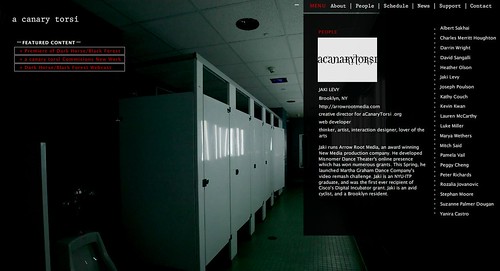
New Site: aCanaryTorsi just launched

Arrow Root Media launches aCanaryTorsi.org

I’ll spare you the details – for now.

For the moment, take a look at http://acanarytorsi.org/

[screenshot below]

Best New WordPress Themes

I was looking around for some new wordpress themes, and remembered the one I used for a recent site for Little Big Pictures. The theme was Oulipo and was designed by Andrea Mignolo. One of her themes was recently among the themes named “Best WordPress Theme for 2008″

Here’s bestwpthemes.com’s selection of the best themes of 2008. There are 45 themes in all, divided between free and premium themes. I’ve selected just a handful. For the full list, visit the bestwpthemes.com site.

The best free WordPress themes of 2008

Typebased


Andrea


Charade


Revolution White Canvas


Revolution Album


Elegant Grunge


Carrington


Sirup


Equilibrium


Blass2


Upstart Blogger Swiss


Vostok

See the rest of the themes at bestwpthemes.com

WordPress Tutorials, Video Mode

I found a GREAT repository for video tutorials on wordpress – I’ve listed a few below, but make sure to visit SpeckyBoy for theFULL LIST of TUTORIALS.

WordPress 2.6 Video Collection 

via ithemes.com
Wordpress Video Collection· WordPress Overview › (Basic).
· How to edit Posts/Pages › (Basic).
· How widgets work › (Basic).
· How to Upgrade WordPress Using the Automatic Plugin › (Basic).
· How to Add new Users › (Basic).
· How to Change/Activate Themes › (Basic).
· WordPress Settings Overview › (Basic).
· How to login to WP Dashboard › (Basic).

WordPress Video Collection from siteground.com

Wordpress Video Collection· How to install WordPress › (Basic).
· Getting started with WordPress › (Basic).
· Arrange your blog posts in categories › (Basic).
· Manage comments in WordPress › (Basic).
· How to change the theme › (Basic).
· How to install WordPress plugins › (Basic).
· Create a backup of WordPress › (Advanced).
· How to upgrade the WordPress version (Basic).

WordPress Video Collection from killersites.com

Wordpress Video Collection· Installing WordPress › (Basic).
· Configuring WordPress Part 1-8 (Advanced).
· Customizing the WordPress Text Editor › (Basic).
· Introduction to building WordPress themes ›. (Advanced).
· Building a WordPress Template Part 1 of 3 ›. (Advanced).
· Building a WordPress Template Part 2 of 3 themes ›. (Advanced).
· Building a WordPress Template Part 3 of 3 ›. (Advanced).

Adding Images to your WordPress Pages and Posts

This video tutorial will show you how to add, edit, and mange images within your posts.
Watch it below, or watch it here.


WordPress Tutorial (2.6.1): Image Upload, Edit, Align and Captio

You can find more great video tutorials at Likoma.

We’ve launched Daniel Gwirtzman’s site!

I’m happy to say we’ve officially launched Daniel Gwirtzman Dance Company’s new site!

Actually, I’m quite impressed with the final product we put together for the Daniel Gwirtzman Dance Company. With the help of great media all around, we were able to piece together a photo gallery, a video gallery, a new subscription system, and even an SMS delivery system for his audiences.

It’s really been great working with Daniel and his company. They really did a phenomenal job in gathering their assets, organizing their content, and creating compelling videos. Congratulations, Daniel! It’s exciting to know I’ll be able to continue to help you communicate your wonderful work!

If you like this, take a look at my other work.

[screenshots follow]

http://gwirtzmandance.org/

About Page | Features: Large Image on each page, drop-down navigation, links to video gallery, customizable sidebar navigation

http://gwirtzmandance.org/

Home Page | Features: Slide show, customizable footer area, drop-down navigation bar

While launching the site, I found this guide to be particularly useful:
http://codex.wordpress.org/Giving_WordPress_Its_Own_Directory

I initially setup this wordpress site in a subdirectory ( /wordpress ) so that I could develop things without affecting their active site. After the wordpress site was all setup, I needed to make the switch. The article above did the trick for me.

I’d love to hear your thoughts – share your ideas and leave a comment!

Great WordPress Plugins for Flickr

[via speckyboy]

Flickr and wordpress have really changed the web-0-sphere. They simply make sharing multimedia, photos, and ideas simpler. During my endless search for more great wordpress plugins, I began searching for easy ways to integrate flickr with wordpress, and saw this great article.

If you’re looking to integrate photos into your wordpress site, install these plugins and get crackin’ !

[Most of the content here is a repost. Click for the full article.]

Flickr Photo Album for WordPress

Wordpress Flickr PluginDescription: This Flickr plugin for WordPress will allow you to pull in your Flickr photosets and display them as albums on your WordPress site. There is a pretty simple template provided, but you can customize the templates 100% to match the look and feel of your own site. And if you want, you could also hook it up with Lightbox or any other number of display libraries.

On the backend, this plugin will also add a new Flickr icon to your WordPress edit screen which will allow you to easily insert your Flickr photos into your blog posts with just a couple clicks. You can either have your inserted photos link back to your WordPress Flickr photo album or directly to your Flickr.com photo page.
URL: http://tantannoodles.com/toolkit/photo-album/.

Flickr Manager for WordPress

Wordpress Flickr PluginDescription: WordPress Flickr Manager is an easy to use plugin that seamlessly integrates your Flickr account with your WordPress backend. It replaces the browse panel from previous versions, but legacy mode can be enabled through the options menu. You also have the choice between Highslide and Lightbox.
URL: http://tgardner.net/wordpress-flickr-manager/.

Flickr Tag Plugin for WordPress

Wordpress Flickr PluginDescription: This plugin downloads all of your Flickr images onto your own server and allows them to appear on your own gallery. Nice and simple.
URL: http://www.webopticon.com/archives/148.


SimpleFlickr for WordPress

Wordpress Flickr PluginDescription: This is a plugin for WordPress that allows you to embed a flickr integrated simpleviewer into your WordPress site. In addition, you are able to specify a path to a standard SimpleViewer XML configuration file to display images from a local gallery.
URL: http://wordpress.org/simpleflickr/.

Slickr Gallery for WordPress

Description: Slickr Gallery is a very fast, bandwidth-friendly photo gallery plugin for WordPress. It allows you to pull your Flickr-hosted photos into a gallery section of your blog, as well as easily add Flickr-hosted images to your posts and pages. It is especially useful for people with many Flickr albums/photos.
Slickr Gallery needs a Lightbox plugin to work properly.
URL: http://stimuli.ca/slickr/.

FlickrRSS for WordPress

Description: This plugin for WordPress allows you to display Flickr photos on your weblog. It supports user, set, favorite, group and community photostreams, and is relatively easy to setup and configure via a settings panel. The plugin also has cache support, allowing you to save thumbnails on your own server.
URL: http://eightface.com/wordpress/flickrrss/.

Flickr Thumbnail Photo stream for WordPress

Description: The Flickr Thumbnail Photostream WordPress plugin makes including and linking to photos on a Flickr account simple and flexible. The links come in the form of thumbnail images that link to their larger, normal formats within the Flickr website. The advantage of this plugin is that it does not use RSS feeds and uses the Flickr API instead.
URL: Flickr Thumbnail Photostream.

Flickr Gallery for WordPress

Description: Using the “shortcodes” system in WordPress 2.5 and up, this plugin will allow you to quickly and easily incorporate your Flickr photos into your WordPress pages and posts.
URL: http://wordpress.org/extend/plugins/flickr-gallery/.

Thanks to speckyboy for a great article!

Make sure to visit his site for more great wordpress tips.