“Facebook’s current privacy model revolves around “networks” — communities for your school, your company or your region. This worked well when Facebook was mostly used by students, since it made sense that a student might want to share content with their fellow students.
Over time people also asked us to add networks for companies and regions as well. Today we even have networks for some entire countries, like India and China.”
Still with us? Okay – this is the “good” stuff: “The plan we’ve come up with is to remove regional networks completely and create a simpler model for privacy control where you can set content to be available to only your friends, friends of your friends, or everyone.
We’re adding something that many of you have asked for – the ability to control who sees each individual piece of content you create or upload. In addition, we’ll also be fulfilling a request made by many of you to make the privacy settings page simpler by combining some settings. If you want to read more about this, we began discussing this plan back in July.
Since this update will remove regional networks and create some new settings, in the next couple of weeks we’ll ask you to review and update your privacy settings. You’ll see a message that will explain the changes and take you to a page where you can update your settings. When you’re finished, we’ll show you a confirmation page so you can make sure you chose the right settings for you. As always, once you’re done you’ll still be able to change your settings whenever you want.
We’ve worked hard to build controls that we think will be better for you, but we also understand that everyone’s needs are different. We’ll suggest settings for you based on your current level of privacy, but the best way for you to find the right settings is to read through all your options and customize them for yourself. I encourage you to do this and consider who you’re sharing with online.”
Ok – everybody got that?
Make sure you review and update your privacy settings when the time comes.
In other Facebook news, Facebook has also updated its policies on sweepstakes. For more on what that might mean, read this great article on TechCrunch about spamming people and making a shitload of money on facebook (written by Dennis Yu, a former spammer).
Ok – now you can enjoy Eddie Izzard’s Cake or Death in Lego Stopmotion
Note: This post was written for participants in an ecommerce seminar. Please feel free to leave questions + comments below
To sell items online, you need:
a payment gateway (like paypal) to process payments
a good shopping cart solution
an SSL seal (if you’re processing credit cards on your website)
If you’re starting from scratch, don’t have the support of a developer, or just want an online store, consider Shopify. They have beautiful templates, and can help your online store get up and running quickly. Review pricing and take a tour of what Shopify offers. They’re great!
Below is a “short” list of payment gateways and shopping cart solutions.
PAYMENT GATEWAYS
A payment gateway processes the payment for you. Paypal is by far the most popular payment gateways. Here is a list of other payment gateways.
Paypal
The current leader in processing sales online. They have a great list of resources for shopping carts here.
ejunkie
A fantastic solution, starts at $5/month. Take a look at their pricing)
Authorize.net
If you want to process credit cards with your own bank, authorize.net is the way to go. Fees usually start at $20/month. You will need to purchase an SSL seal to use Authorize.net.
NOTE: If you’re running your website with WordPress, use WP-ecommerce. If you’re running your website with Drupal, use Ubercart. Otherwise, there are these other solid solutions.
Facebook Groups have long been a part of the Facebook experience as a way for people to organize and discuss particular issues of interest. However, until now, Group activities have been isolated to the group page and it was often difficult to find out what currently was going on within a group. We have received feedback from many of you saying that you want to know more about what is going on within your Facebook Groups, in the same way you know what is happening with your friends and other connections on the site — on your home page.
Starting today, we’re transforming Groups to make it easier for you to communicate with other members and create a smoother experience as you browse through Facebook. If you don’t see the new design just yet, you will soon. We’re currently testing it with a small percentage of people on the site and will roll it out to everyone in the coming days.
First, we revamped the design for Groups so that they look similar to other parts of the site such as profiles and Pages. This means that groups will now have a Wall that summarizes all the recent activities of people within the group and a Publisher that enables members to share their content.
Second, group activities, which previously only appeared in the group, will now be delivered to your News Feed. To ensure that you get the most interesting and relevant content from groups you’ve joined, you only will see stories when one of your friends posts within a group rather than when all members post. For example, you now will see a story when your friend uploads photos from a recent party at your high school alumni group or when one of your friends posts a message on the Wall of your pick-up soccer group saying that there is a special game this week.
Interacting with Groups will become easier since you can follow the links to the content directly from the News Feed stories or make comments on these stories directly from your home page. You can choose to see only group-related stories on your home page by sorting by Groups from the filters on the left-hand side.
Keep in mind that while Groups and Pages now look the same, they still serve different purposes. Groups are for fostering member-to-member collaboration, while Pages remain the best way to broadcast messages to your fans if you are a business, organization, public figure or other entity.
You can form a Facebook Group around any community you’re connected to in your real life: book clubs, sports teams, churches, whatever you want. To date, there are over 45 million groups on the site. If you aren’t a member of a group yet, search for one to join or start your own.
For non-profits, November and December translate to donation season. For businesses, it’s a time to think about what deals to offer their customers. And for marketers, it’s time to think – how will I help businesses reach the RIGHT customers?
With consumers determined to limit their holiday spending, a new study predicts they will do more of their Christmas bargain-hunting through social media, and less through search engines or shopper review sites.
The study, from Oneupweb, compared holiday traffic trends over the last two years at the top-ranking e-tailers, social sites and review sites against the latest user trends, and found that while search engines have typically been the leading driver to retail sites, “social media is influencing search behavior and affecting the purchases a consumer makes.”
“We found that traffic to social sites steadily gained on retail sites in 2007 and 2008,” it says. Despite a holiday bump, direct traffic to online retail sites fell 10%, behind traffic to social sites, which grew 12% from December 2007 to December of last year. “Traffic to the review sites remained stagnant throughout the year, experiencing a mild bump during the holiday season,” the report says.
Will you be using social networks to drive sales this holiday season? If so, how will you work to adjust your existing marketing budget?
In February, I did a presentation called, “How to Ruin Your Online Reputation”
One of the sure-fire ways to ruin your reputation is to call yourself a social media guru (or allow others to call you that).
This video sums up the pitfalls of working with a self-proclaimed social media guru
This. Is. Hysterical.
There’s cursing in here, so you may not want to play it at work.
Please join me and Fran Kirmser at The Field for a hands-on workshop: PR for the 21st Century
During this workshop, we will help you plan an effective PR campaign. We will also list best practices, and review tips for reaching traditional press, bloggers, and fans.
Here’s the official word:
In a culture saturated with information, how can an artist continue to stand out from the pack? What are some new (and old) methods to help your work get noticed? Join us at The FAR Space to explore the intersection of traditional marketing streams with newer web-based media platforms. Hear examples of creative and effective marketing campaigns and best-practices for how to get the word out in the 21st century.
Last night, a group of bloggers, producers, artists, choreographers, and critics gathered to discuss a very important question – in a shifting world where the role of print media is shifting, what is the role of the critic (particularly in the world of dance)?
In the arts, press = $. If you get good press, you get more bookings (from presenters), more donations (from patrons and board members), and more people come see you. So the (basic) formula goes. So, Press is important. Duh. But press does not equal critics. And critics do not exist for the sole purpose of generating good press for art. Critics write to generate dialogue. Is this still the case? More importantly, will that be the case 2 years from now? Probably. It should.
But can bloggers actually fulfill the same role that the critics from the New York Times (and other reputable publications) have filled for the past X amount of years? And what were those roles to begin with?
You’re welcome to debate these questions in the comments. But for the purpose of this particular post, I’ll focus on the role of bloggers, and what I see as an evolution of publicity, audience development, and general discourse around art work. To grossly generalize and simplify things, I’ll break it down into 2 camps. Bloggers are bad, and bloggers are good.
In his book, The Cult of the Amateur, Andrew Keen takes the position that bloggers and “the crowd” are diluting our culture. In a NYTimes review of his book, Michiko Kukutani writes
“what the Web 2.0 revolution is really delivering is superficial observations of the world around us rather than deep analysis, shrill opinion rather than considered judgment.†In his view Web 2.0 is changing the cultural landscape and not for the better. By undermining mainstream media and intellectual property rights, he says, it is creating a world in which we will “live to see the bulk of our music coming from amateur garage bands, our movies and television from glorified YouTubes, and our news made up of hyperactive celebrity gossip, served up as mere dressing for advertising.†This is what happens, he suggests, “when ignorance meets egoism meets bad taste meets mob rule.â€
Essentially, he takes the position that the wisdom of the crowds essentially creates a popularity contest. Google search results, he claims, are based on popularity and not relevance. On the other hand, Dan Gillmor has a more optimistic and positive view on the publishing revolution. In his book, We the Media, Gilmor writes:
The rise of the citizen-journalist will help us listen. The ability of anyone to make the news will give new voice to people who’ve felt voiceless — and whose words we need to hear. They are showing all of us — citizen, journalist, newsmaker — new ways of talking, of learningxxix
Many writers have lost their jobs as critics for reputable publications. If writers who have been laid were to publish on a blog, would their word be valued any less? If Elizabeth Zimmer published a critique or piece on her own blog, is her writing any less valid? I trust we live in a world where this is not the case. So why are we not seeing more writers who have been laid off blog on their own sites?
We still believe in mainstream media. Mainstream media still serves a purpose. Read more
Many individuals, companies, and non-profits I work with ask, “Should I setup a facebook profile for my company? Won’t it be a time suck? Is it really worth it?” The bottom line for many of my clients: they are worried about spending more time on the computer, and less time on running their company. A recent article on ReadWriteWeb delves into this very issue.
Personally, I think it’s quite simple. If you’re actively producing online social media (participation on facebook, twitter, etc.), you’re already more engaged. And if you’re more engaged with your customers, clients, and audiences, financial success will follow.
One of the more interesting “discoveries?” Companies had more success when deeply engaged on a few sites than lightly engaged on many sites. “It’s not about doing it all, but doing it right.”
Read the full article below for ReadWriteWeb’s summary of the recent study: [originally published on ReadWriteWeb]
A new study released by enterprise wiki provider Wetpaint and the Altimeter Group shows that the brands most engaged in social media are also experiencing higher financial success rates than those of their non-engaged peers. To determine this relationship, the study focused on 100 companies from the 2008 BusinessWeek/Interbrand Best Global Brands survey and the various social media platforms they used like Facebook, Twitter, blogs, wikis, and forums. Although it’s difficult to prove for certain that the companies’ involvement in social media has led to their increased revenues, the implication behind the new data is that it has.
After examining the companies and their social media activity levels, the brands were ranked on an “engagement scale” where scores ranged from a high of 127 to a low of 1. Those brands that were the most engaged saw their revenue grow over the past year by 18% while the least engaged brands saw losses of negative 6%.
Four “Engagement Profiles”
The study grouped the brands into one of four engagement profiles that related to the number of channels they’re involved in and how deep that involvement is. At the top of the list are “mavens,” the brands heavily engaged in seven or more social media channels – like Starbucks and Dell, for instance. “Butterflies” are like wannabe “mavens,” and are also engaged in seven or more channels but are spread too thin, investing in some channels more so than others. “Selectives” focus on six or fewer channels but engage customers deeply in the ones they’ve chosen. Finally, there are “wallflowers,” or brands engaged in six or fewer channels with below-average engagement; these include companies like McDonalds and BP.
Out of the top 10 brands engaged in social media, the mavens dominate the list. All of the top 10 are mavens and have seen financial success even in a down economy: Read more
Tonight, I will be joining a group of Immigrant Artists in New York City to discuss how to make use of the vast resources available in NYC and beyond. I will focus on developing audiences online, and doing strategic outreach using multiple online channels such as email marketing, and increasingly popular social networks.
Join NYFA and BAC for a fun evening. Come meet artists, and learn about new resources….
Conversations: Rediscovering Community Resources to Sustain your Art
New York City can seem overwhelmingly vast, divided, and impersonal to newcomers and longtime residents alike, and presents specific challenges to artists struggling to create, often in isolation. To help newer New Yorker artists keep on creating, NYFA’s Immigrant Artists Project (IAP) proposes a forum called Conversations for immigrant and culturally specific artists to exchange stories, expertise and support with their peers, building community and sharing resources to further enrich their artistic lives. IAP is hopeful this will be the first of a series of forums hosted at NYFA in conjunction with organizations such as BAC.
Our inaugural Conversations forum will focus on recognizing and drawing on existing community-based resources in the current economic-political climate, with guests presentations by Cecilia Jurado and others to be announced. Participants will share their experiences in persevering in their arts practice in spite of immediate financial burdens, lack of funding opportunities, and in finding alternative resources within their own communities.
Please come prepared to share your own stories!The evening will be devoted to networking, with refreshments served, following brief guest presentations. Feel free to bring promotional materials to share with our group.
This event will be hosted at the NYFA Offices:
New York Foundation for the Arts
20 Jay Street, 7th Floor
Brooklyn, NY 11201
This event is part of NYFA’s Immigrant Artist Project (IAP). Through this project, NYFA seeks to expand the community of artists it serves by nurturing new connections among artists and organizations, and by fostering a supportive community of empowered artists with diverse educational, cultural, and creative backgrounds.
Brooklyn Arts Council (BAC) strives to enrich the quality of life throughout Brooklyn by fostering, encouraging and promoting the arts through service and support to artists and arts organizations. BAC Folk Arts works with Brooklyn-based folk and traditional artists and their communities to identify, document and present arts that express the boroughs’ diverse living heritage.
OVERVIEW
Over the past year, I’ve produced a few webcasts for dance companies. I recently wrote an article about these webcasts, asking questions – mainly – is it worth it?
For this article, I’ve included a few insights and considerations for producing your own webcast.
The examples I will look at include Misnomer’s webcast in December, DanceBrazil’s webcast in March, and another Misnomer webcast in April. Two of these webcasts were done in conjunction with a season, whereas Misnomer’s performance in April was a work in progress showing.
All of these webcasts were done with a few goals in mind.
1. Diversify Audiences (Build New a Audience, online)
2. Expose current audience members and their friends to the work and company (Broaden our reach)
3. Give audience members who already saw the work (Deepen the experience of existing audience members)
Additionally, it was quite important to consider these webcasts as a web event. These webcasts were successful because they were conceived as a web specific piece. Online audience members were excited to chat with each other and experienced a unique event. In preparation for all events, I prepared online media (photos, blog entries, interviews, slideshows). While preparing these materials, I was conceiving a unique online experience. I thought, “What would hyperlinked program notes look like?” and went about publishing and sharing those materials online.
TECHNOLOGY
The technology required was not too complex. For the Misnomer webcasts, I signed up for an account on UStream.tv. For DanceBrazil’s webcast, I partnered with Dance-Tech.net, and used Mogulus (now LiveStream). LiveStrea and UStream.tv are currently very popular solutions for producing a webcast. Both services offer many broadcasting options, including overlays, pre-roll video, and even a webchat. All of these options were great additions to the webcast. However, the webchat proved to be one of the more engaging experiences. While you are doing your webcast, you can also record video, and archive it. This webcast can also be rebroadcast and embedded on other sites and blogs if you wish. In short, it’s like YouTube, but live.
To produce a good webcast, you will need to ensure your video quality is optimal. Invest in a good camera person, and practice. Just like you would do a tech rehearsal for your stage performance, you should do a tech rehearsal for your webcast. You will be connecting your video signal from your camera (or video mixer) to a computer, so you need to make sure the video looks excellent. You should also ensure your internet connection is optimal. I would not recommend doing a webcast with a wifi connection. To ensure the best quality and the highest speed, make sure your laptop or computer is connected to the web via an ethernet cable.
In addition to a videographer, you should also secure at least one solid person to handle all things online. While the videographer is focused on the image quality and overall video shoot, the online moderator will be focused on the web experience, webchat, and quality of the streaming experience.
After you secure your team (and good internet connection), you will simply connect the video signal to your laptop or computer. UStream.tv + LiveStream both have a fairly straight forward interface. As long as you have your video signal connected to your computer (via firewire), and you are signed into your UStream or LiveStream account you can start broadcasting. Like a good videographer, it is imperative you have someone onsite to monitor the online experience, moderate the webchat, and ensure the web experience is optimal.
SURPRISES
The webcast did not take away from ticket sales. I was chatting live with all the online, I did not encounter any online viewers who opted to see the work online instead of in the theater. Many people who were watching the webcast had already seen the work. Also, some viewers of the webcast were not able to see the work, so this was a nice replacement for them.
There were also many viewers from different countries. All three webcasts were produced from New York City. However, we had visitors from over 19 countries including Brazil, Turkey, Israel, Spain, England, Canada, and Germany. For Misnomer’s webcast in December, we had over 1200 viewers. This means that Misnomer had more viewers – online – in 1 night than they had during the entire run during the New York Season.
Another surprise – more people came to the websites after the webcasts. I archived all 3 webcasts online, and offered viewers a chance to see it again. Since many viewers were not able to make the performance or live webcast, they came to see the video after the fact. With DanceBrazil, more people visited DanceBrazil.org the day after the webcast than any other day of the year. Additionally, many people subscribed to DanceBrazil’s email newsletter as a result of the webcast.
Simply stated, the webcasts provided a great experience for current fans and audience members. They were able to connect with the company in a new way, and on their own time. For many new fans, the webcasts gave them a unique way to experience dance, and ask questions. Several viewers had never seen the company’s work live, and this was their first encounter with the work. On the other hand, some people found the video quality inferior, and did not like watching the performance online.
As video quality continues to improve, and audiences continue to diversify, performing arts organizations will have to diversify their methods of presentation. Providing a high quality experience online and in the theater are equally challenging and essential. Producing a webcast for your audiences is a great way to reach new audience members across the globe, and deepen your current audience’s experience online.
SUMMARY
1. Test. Test. And Test. For all webcasts, we did a few tests.
2. Hiring a good camera person is essential.
3. Testing is also critical. Just like you would tech a show before premiering, do a few tech rehearsals with your streaming gear.
4. Make sure your venue has a fast Internet connection. Don’t use wifi to stream.
5. A webcast is markedly different from a stage performance.
6. Prepare online content for your online viewers
7. Make sure you have an online chat moderator who understands the company and the work.
And finally…
Feel free to contact me with any questions.
In any community, online or otherwise, there will be varying levels of engagement among members. At the Social Media Influence Conference in London this week, Guillaume du Gardier who is New Media Executive at Ferrero explained his pyramid model for understanding passive and active visitors to his brand’s various online communities. Thanks to Guillaume’s inspiration, I have distilled a general pyramid framework with four levels:
At the top of the pyramid are a small number of creators, including your most influential community members. They are your evangelists, most ardent fans, and passionate contributors of new ideas.
Next are those who tend to comment on, though generally not contribute, ideas and discussion threads already put forth by others. These individuals are essential for creating a sense of dialogue across different members of the community, for helping to refine ideas and make them better.
One step down are people who vote and tag items in your community. They express their preferences and opinions in the lowest-commitment way possible, but are still engaged.
Last but not least are the bulk of your community visitors: people who are just visiting, consuming content but not participating per se.
Online marketing managers need to understand what the pyramid looks like for their particular communities, how they can encourage people to become increasingly engaged over time, and how specifically each engagement level might lead to or be correlated with sales. For many of us, this might be a better, more nuanced way for linking our marketing funnel (as measured by online engagement in this case) and sales pipeline in the Facebook Era.
Beginning this Tuesday, I will be leading a 3 week workshop at The Field. The workshop is focused on building a solid and meaningful internet presence, and is geared towards practicing Artists and Arts Organizations, looking to build new audiences and connect with their current base.
The workshop ranges from the very practical nuts + bolts to a broad strategy. In the past, I have given overviews and tutorials of various online platforms including Facebook, Email Marketing Software, Content Management Systems, and WordPress.
I know there are some readers + subscribers who’ve taken the workshop before – I’d love to hear from you!
If you’re reading and have any comments about the past workshops, please feel free to add them here.
CURRENT PARTICIPANTS SHOULD
Join the facebook group for this workshop [click here]. If you don’t have a facebook account, you will need to set one up.
Ask almost anyone if they would like to be able to change the Google results for their name and you’ll get a hearty “Yes.” What would they mean by that? Probably that they would like to have the ability to remove unsavory information about themselves from the Google index.
That is certainly not what Google Me offers! The program offers people control over their search appearance only in as much as they are willing to give Google more information about themselves. Google’s Joe Kraus explained to us that up to four Google Profiles will appear at the bottom of a results page. For people with common names, the more information you’ve filled out in your Google Profile – the more likely your profile will be selected for display.
How it Works
Google me? I’ll Google you! Google has become the de facto public record these days but most people remain in relative obscurity there and/or fear of what past indiscretions Google will expose to people who search for them.
Today Google released a product, called Google Me, that aims to change all of that. For a price – though not a monetary one.
Starting today, searchers who enter only the word “me” in the search box will be given an opportunity to set up or edit their Google Profile.
When someone searches for a name that matches a Google Profile, that profile may now be displayed at the bottom of the search results page.
Google Profiles have a lot of potential as big, standardized online identities. They are tied to online accounts on other websites and they contain lots of interesting information about people. There’s a lot of potential for outside developers to build interesting things on top of these profiles.
A few months ago, I discovered The Moth podcasts. The Moth is a non-profit, and essentially an open-mic for storytelling. A.J. Jacobs, one of The Moth storytellers, recently told a story about outsourcing, which is where I first heard about Virtual Assistants. While you’re reading this, click play below. Take some time to watch the podcast.
The podcast, though, is only a summary of the article A.J. wrote for Esquire.
[read the full article here]
So after hearing this podcast, I was a little conflicted. Should I really hire a virtual assistant?
There were some practical questions. For example, if I hired someone, what should they do? Should I hire someone to handle work I should be doing? Afterall, if I can’t get something done myself, is it worth doing?
I put my conflicts, worries, and anxieties aside. I was inspired. At first, I really wanted to hire Honey from India, the assistant that A.J. Jacobs worked with. What firm did she work for? With that question, I was off. I started my search. There were many more options than I could ever hope for. I looked around for a while, and signed up for a few but finally settled on BPOVIA.
Unlike AJ’s outsourcing firm, BPOVIA is based in China, not India. What’s truly amazing is that you not only get 1 person, but a whole team of people.
After signing up for 10 hours of help and assistance, I received a confirmation email from Yvonne within 24 hours. In addition to doing repetitive tasks like data entry, they also provide many other services, including Graphic Design, Accounting, Invoicing, and even Tax Preparation!
BPOVIA uses Basecamp to manage tasks, to-do’s and store files. I’ve been using Basecamp to run things on my end for over 1 year, so I was very pleased to see they use the same online software.
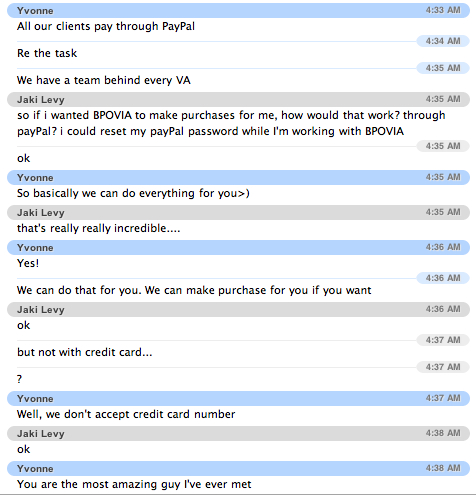
Above all, they are incredible kind, and apparently can do everything. I mean EVERYTHING! For proof, take a look at my chat transcript below.
I still have another 9 hours to go with BPOVIA and am already considering getting more time…
Check back for another update at the end of my 10 hours.
In the meantime, here are few other links I pulled up…


 Please join me and Fran Kirmser at The Field for a hands-on workshop: